
CASE STUDY
All case studiesFrom Manual Accounting Backlogs to Connected Financial Workflows
How an accounting firm automated invoice preparation, bank reconciliation and monthly reporting within its existing financial system—reducing repetitive administration and making more work ready for professional review.
01THE CHALLENGE
Accountants were spending too much time preparing information before they could act on it.
The firm's core challenge wasn't a lack of accounting expertise. It was the amount of repetitive preparation required before that expertise could be applied.
Invoice processing, bank reconciliation and financial reporting each depended on manual steps that accumulated across client accounts.
Every supplier invoice created another data-entry task. Invoices arrived through email and document attachments, often with different layouts and supporting information. Staff needed to read each invoice, identify the relevant fields, verify supplier information and enter the details into the accounting system. The work was repetitive but still required accuracy. A missing reference, incorrect amount or misidentified supplier could result in additional investigation and correction. During periods of higher document volume, the growing invoice queue placed more pressure on the accounting team.
Bank reconciliation depended on repeated matching and investigation. Matching bank transactions against recorded invoices, bills and other accounting entries was another recurring workload. Straightforward transactions were often predictable, but differences in descriptions, recurring payment patterns and incomplete references made some matches harder to identify. Staff had to investigate uncertain transactions and maintain visibility over items that were still unresolved. The process required careful review, but too much time was being spent repeatedly working through transactions that followed recognizable patterns.
Monthly reports had to be assembled from financial data. Preparing client reports involved retrieving accounting records, organizing figures, applying report formats and developing useful commentary around changes in financial performance. Different staff members could approach the same reporting task differently, creating inconsistencies in presentation and additional review work. Senior accountants were spending time assembling financial information instead of focusing primarily on interpreting it.
More staff would not necessarily solve the underlying problem. The firm could add capacity, but hiring more people to perform the same repetitive processes would leave the underlying workflow unchanged. What the business needed was a way to reduce manual preparation while preserving the accuracy, professional judgment and review that accounting work requires.
02WHAT WE BUILT
Three connected automations built around the firm's existing accounting platform.
We implemented a set of workflows designed to handle predictable accounting administration while keeping exceptions and professional review visible to the team.
Rather than introducing a replacement accounting platform, the system uses integration with the existing environment to move information through established processes.
AI-assisted invoice extraction and preparation: Incoming invoice documents are processed to identify relevant information such as supplier details, invoice dates, references, line items and amounts. Extracted information is checked against configured supplier records and required accounting fields. Where the information meets the workflow's requirements, the system prepares a draft bill inside the accounting platform. Accountants can review the prepared record rather than manually entering every supported invoice from the beginning.
Automated transaction matching and reconciliation support: The reconciliation workflow compares bank transactions with relevant accounting records. It uses configured matching rules and patterns drawn from historical transactions to identify likely matches. Straightforward transactions can move through the configured matching process, while ambiguous or unmatched items are surfaced for staff review. This reduces dependence on manually searching for every transaction relationship.
Standardized financial report generation: The reporting automation retrieves financial information from the existing accounting platform and applies it to consistent report templates. It also prepares commentary around relevant variances, helping accountants review changes and identify items that may need explanation. The result is a more structured starting point for monthly financial reporting rather than a report assembled manually from multiple exports.
Exception handling and team notifications: Not every invoice or bank transaction can be resolved reliably through automation. The workflows identify incomplete records, uncertain matches and other exceptions requiring attention. Internal notifications help direct those items to the appropriate staff, so automated preparation does not mean questionable records are silently accepted.
Integration with established accounting operations: All three workflows were designed to work with the firm's existing financial records and accounting processes. This preserved familiar working practices while reducing the need for repeated data transfers, manual document handling and disconnected reporting preparation.
03HOW IT WORKS
Three parallel workflows support everyday accounting operations.
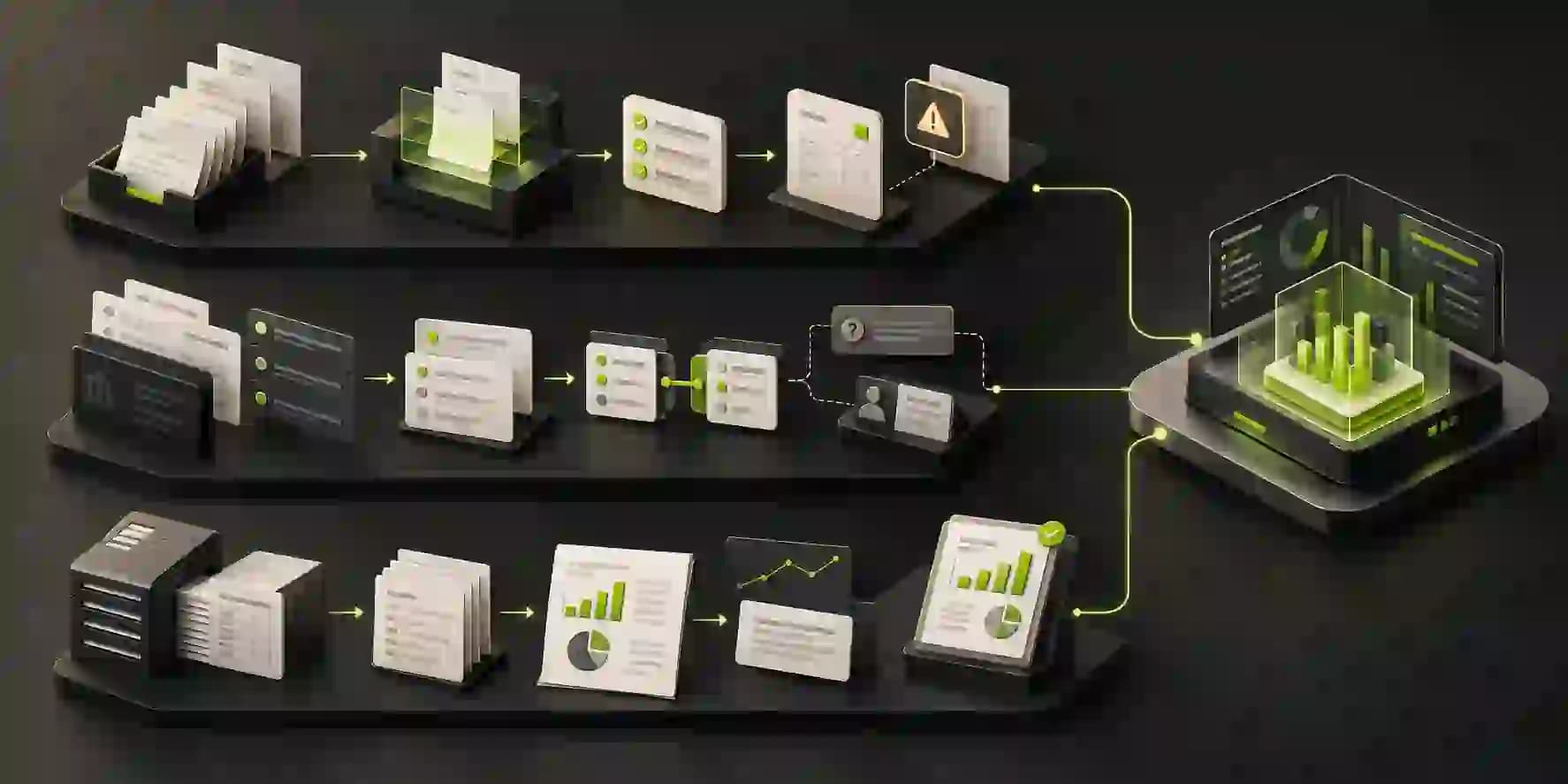
The implementation includes separate automations for invoice processing, reconciliation and monthly reporting. They connect to the same accounting environment but operate according to different inputs, triggers and review requirements.
PROCESS 01
A · Invoice Processing
- 01
Capture and extract invoice information
When a supported supplier invoice enters the configured intake process, the workflow reads the document and extracts the information needed for accounting entry.
- 02
Validate and prepare the accounting record
The extracted fields are checked against available supplier information and configured validation rules. For eligible invoices, a draft bill is created in the accounting system.
- 03
Route exceptions for review
Missing fields, inconsistent information and uncertain extraction results are surfaced for accountant review before the relevant record is finalized.
PROCESS 02
B · Bank Reconciliation
- 04
Retrieve transactions and relevant records
The reconciliation workflow accesses bank transaction information and the corresponding accounting records required for matching.
- 05
Apply matching logic
Configured rules and historical transaction patterns help identify likely relationships between payments, invoices, bills and existing ledger entries.
- 06
Surface uncertain transactions
Transactions that cannot be confidently matched are made available for review, together with relevant matching information, so accountants can resolve them without repeating the entire search process.
PROCESS 03
C · Monthly Financial Reporting
- 07
Collect reporting information
The reporting process retrieves the necessary financial data from the accounting platform.
- 08
Prepare standardized reports
The data is organized into established reporting templates, with automated preparation of relevant variance commentary.
- 09
Support review and distribution
Accountants review the prepared financial information and commentary as part of the existing reporting process. Reports then follow the configured delivery workflow.
04THE IMPACT
Less repetitive preparation. More structured accounting work.
The implementation introduced automated preparation across three recurring accounting processes. The following benefits describe the operational capabilities supported by the deployed workflows; specific numerical improvements have not yet been verified.
Reduced dependence on manual invoice entry
Supported invoice documents can be processed into draft accounting records, reducing the need to transcribe every field manually. Staff can direct more attention toward checking exceptions and confirming the accuracy of prepared records.
More consistent reconciliation preparation
Recurring matching patterns and configured rules can be applied systematically instead of being worked through manually each time. Uncertain transactions remain visible for accountant investigation.
Financial reports prepared through a repeatable process
Financial data is collected and placed into standardized report structures, with generated variance commentary supporting the review process. This helps accountants spend less effort on formatting and assembling information.
Better visibility over exceptions
Items requiring human judgment are separated from routine processing and can be surfaced through internal notifications. This makes it easier for the team to distinguish normal automation activity from work that needs intervention.
Greater capacity for higher-value accounting work
By reducing repetitive preparation, the workflows can give accountants more room to focus on reviewing financial information, resolving complex issues and supporting client decisions. The important change is not that accounting becomes fully autonomous. It is that professional attention can be concentrated on work where it adds the most value.
05KEY TAKEAWAYS
Practical accounting automation keeps professional judgment in the workflow.
- 01
Automate preparation before trying to automate professional judgment.
Extracting invoice information, preparing matches and assembling reports are different from approving financial records or interpreting their business implications. A useful accounting automation respects that distinction.
- 02
Existing financial systems are often the right foundation.
A business may not need to replace its accounting platform to improve operational efficiency. Connecting repeatable tasks to an established system can address significant workflow friction without rebuilding the entire process.
- 03
Exception handling is part of the automation, not an afterthought.
Invoices with missing information and transactions with uncertain matches need a clear path back to the responsible accountant. Reliable automation must make those situations visible.
- 04
Reporting improves when preparation becomes consistent.
Standardized templates, reliable data retrieval and organized commentary help accounting teams review information more consistently. The aim is to reduce the work required to prepare reports while preserving the judgment needed to interpret them.
06NEXT STEP
How much of your accounting team's time goes into preparing information rather than using it?
If your firm spends significant time entering invoices, reconciling transactions or assembling financial reports, there may be opportunities to automate recurring preparation without replacing your existing accounting systems.
At 99xAutomation, we build practical AI and automation workflows around existing operations, connecting tools, organizing data and keeping human review where it matters.